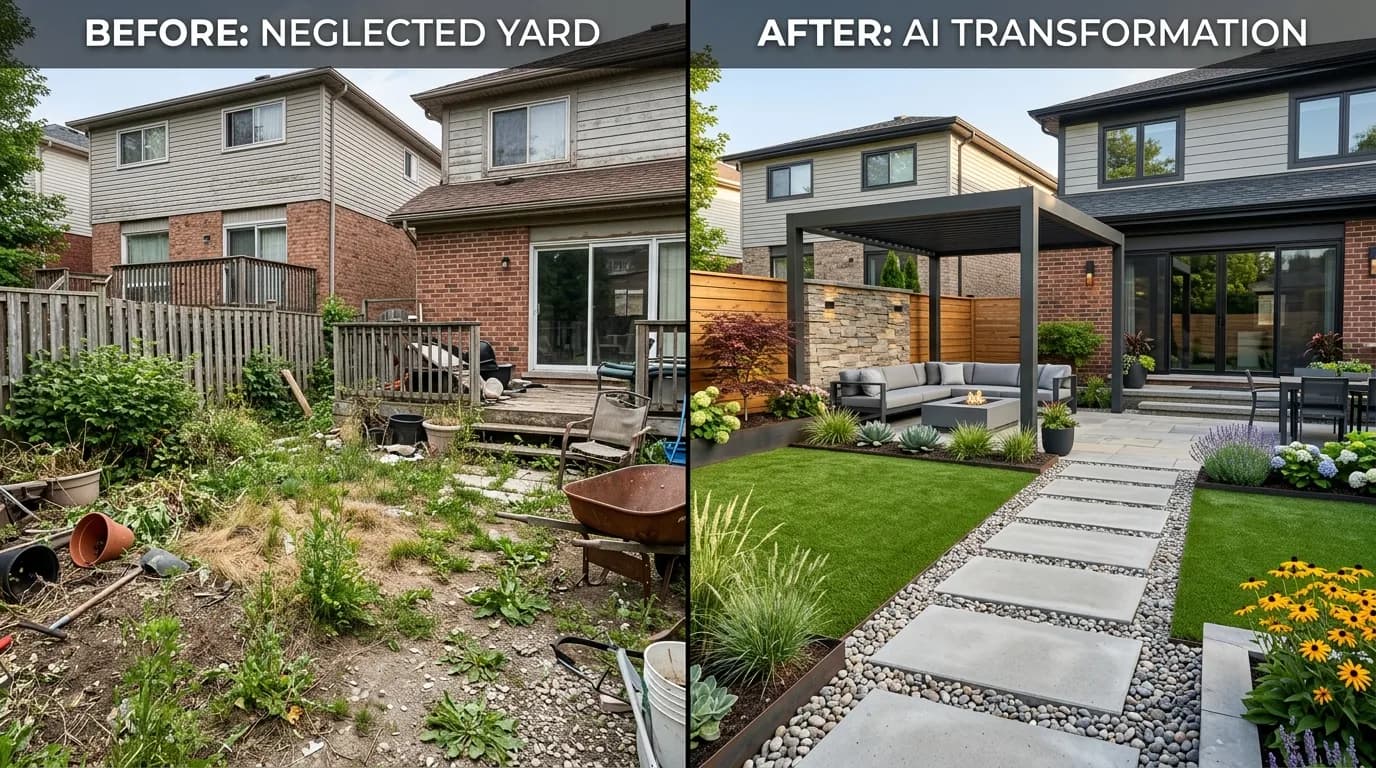
You take a photo of your overgrown, boring backyard. Sixty seconds later, you're looking at three versions of that same space — one with a sleek modern patio and ornamental grasses, one with a full tropical paradise, one with a cottage garden overflowing with roses. Same house. Same fence. Same dimensions. Just completely transformed.
That's what AI yard design from photo makes possible today. And it's not CGI mockups or generic renders — it's your actual yard, spatially analyzed and redesigned by the same depth-aware AI used by professional visualization studios.
Here's everything you need to know.
How AI Yard Design From Photo Works
Traditional landscape design software required you to manually draw your yard, place plants, and adjust everything by hand. It took hours and required design skills most homeowners don't have.
Modern AI yard design tools like Yardcast use a fundamentally different approach:
- 1Depth analysis: The AI analyzes your photo to build a 3D depth map of your yard — understanding what's near, what's far, where the ground plane is, where your house walls and fence are.
- 1Structure preservation: Using that depth map, the AI "locks" your home's architecture in place. Your house doesn't move. Your fence doesn't disappear. The camera angle is preserved exactly.
- 1Landscape reimagination: Within the preserved structure, the AI completely replaces the vegetation, hardscape, and outdoor features according to your chosen style.
- 1Multiple concepts: The AI generates 3 different variations — each one a fully realized design concept — so you can compare approaches before committing to anything.
The result looks like a professional landscape photographer took a photo of your yard after a complete renovation. Because from the AI's perspective, that's exactly what happened.
What Makes This Different From Generic AI Renders
If you've tried other AI image tools for landscape design, you've probably noticed they produce beautiful images that have nothing to do with your actual yard. The house is different. The lot shape is wrong. It's essentially fantasy art, not a design tool.
The difference is depth-guided img2img generation — specifically, models like FLUX Depth that are conditioned on depth maps rather than just text prompts.
When you upload a photo to a depth-guided tool:
- The model extracts the depth map automatically
- It uses that as a "control signal" that constrains the output
- The output image must match the same spatial relationships as the input
- Your house, fence, and ground plane stay exactly where they are
This is the same technology professional visual effects studios use for set extension and environment replacement in film and TV. Yardcast brings it to homeowners for free.
6 AI Landscape Design Styles You Can Try
Yardcast's AI transformation tool offers 6 designer-curated styles, each with 3 variations:
Modern Minimalist
Clean geometry, high-end materials, and a clutter-free aesthetic. Think large-format concrete pavers, ornamental grasses, structural plantings, and integrated LED lighting. Designed for homeowners who want something that feels architecturally intentional.
Best for: Contemporary homes, homes going on the market, urban lots
Tropical Paradise
Layered, lush, and vacation-worthy. Banana trees, bird of paradise, palms, and bougainvillea turn any backyard into a private resort. Works surprisingly well even in non-tropical climates with a mix of tender and hardy tropicals.
Best for: Pool areas, entertainment yards, warm climate zones (USDA 8+)
English Cottage
Overflowing, romantic, and deeply personal. Lavender borders, climbing roses, foxglove, and stone paths create the feeling of a centuries-old English garden. Extremely high perceived value for relatively low cost.
Best for: Traditional homes, front yards, fence lines
Japanese Zen
Serene, precise, and calming. Raked gravel, moss, Japanese maple, stone lanterns, and bamboo features create a meditative outdoor space. Also among the lowest-maintenance designs once established.
Best for: Side yards, shady spaces, homeowners who want low maintenance
Mediterranean
Warm, fragrant, and timeless. Lavender, olive trees, terracotta, wisteria, and stone fountains evoke Tuscany and coastal Spain. Drought-tolerant and beautiful year-round in the right climate.
Best for: Dry climates (California, Texas, Southwest), stucco homes, Mediterranean architecture
Resort / Pool
Pure luxury. Infinity edges, travertine, tropical plantings, and resort-grade furniture turn an ordinary backyard into something from Architectural Digest. High-impact, high-investment, high-return.
Best for: Homes with existing pools, luxury real estate, entertainment-focused yards
Season Preview: See Your Yard in Any Season
One feature that separates Yardcast from every other AI yard design tool is the season preview. Before you generate, you can choose how your transformed yard should look:
- Spring 🌸 — Cherry blossoms, tulips, fresh green foliage
- Summer ☀️ — Peak bloom, full canopy, vivid colors
- Fall 🍂 — Orange and red foliage, fall asters, warm light
- Winter ❄️ — Evergreen structure, ornamental berries, landscape lighting
This matters enormously for plant selection. A design that looks incredible in summer might look stark in winter if it doesn't have evergreen structure. By previewing all four seasons before committing, you can make smarter design choices.
Iterative Refinement: Keep Changing Until It's Right
The AI doesn't have to get it perfect on the first try. Yardcast's refinement feature lets you tell the AI exactly what to adjust:
- "Add a fire pit in the corner"
- "More privacy plants along the left fence"
- "Replace the lawn with decomposed granite"
- "Warmer colors, less green"
Type your request and regenerate — the AI applies your feedback while keeping your yard's structural elements intact. This is how professional designers work: iterate, refine, improve.
From AI Render to Real Plant Plan
The AI transformation is just the beginning. Once you love a design concept, Yardcast can generate a complete 44-page landscape design package that includes:
- Exact plant list — every plant shown in your design, with scientific names, spacing, care requirements, and costs
- Cost estimate — plants, materials, hardscape, and installation labor broken down by phase
- Installation phases — what to do first, second, third for a logical buildout
- Drainage plan — where water flows on your specific lot
- Maintenance calendar — monthly tasks for year-round beauty
- Lighting plan — placement and fixture recommendations
- ROI analysis — how much your landscape investment adds to home value
No other AI yard design tool connects photo transformation to an actionable plant plan like this. You go from "I love this look" to "here's exactly how to build it" in a single workflow.
How to Get the Best Results: Photo Tips
The quality of your AI transformation depends significantly on the quality of your input photo. Here's what works:
Shoot in good light — Natural daylight, overcast is ideal. Avoid harsh midday shadows that create extreme contrast. Early morning or late afternoon golden hour is perfect.
Get the whole yard in frame — Back up until you can see most of your yard, your house (at least part of it), and your fence or property line. The AI needs context to understand the space.
Shoot from eye level or slightly above — Don't shoot from ground level (distorts perspective) or from a second-floor window (the AI has trouble reconstructing ground plane geometry).
Avoid extreme close-ups — The AI needs spatial context. A photo of one flower bed won't transform well; a photo of the whole backyard will.
Portrait or landscape orientation both work — The AI handles any aspect ratio.
HEIC from iPhone works — You don't need to convert your photos. Upload directly from your phone.
Real-World Use Cases
Preparing a home for sale: Professional staging companies know that outdoor spaces have massive ROI. Show buyers a vision of what the yard could be, and you're selling the potential, not just the current state. Several real estate agents now use Yardcast to create AI design sheets for listing presentations.
Briefing a landscaper: Showing up to a landscaper meeting with "I want it to look nice" gets you a generic result. Showing up with three AI concepts of your actual yard and saying "something between concept 1 and concept 3" saves hours of back-and-forth and ensures you actually get what you want.
HOA approval: Many HOAs require design plans before approving landscape changes. An AI-generated concept with a plant list is more than sufficient for most HOA approval processes.
Budget planning: Once you love a design, the cost breakdown helps you understand what's achievable at different budget levels. The plant list tells you exactly what to buy and where to plant it.
Dreaming: Sometimes you just want to see what your yard could look like before you're ready to act. Yardcast lets you explore dozens of possibilities at zero cost.
Try It Now — No Signup Required
Yardcast's AI yard transformation tool is free to try. No account, no credit card, no email required. Just:
- 1Upload a photo of your yard (any outdoor space works)
- 2Choose one of 6 design styles
- 3Select a season preview
- 4Hit "Transform My Yard"
Three AI concepts of your actual yard appear in about 60 seconds. If you love one, get the full design package for $29 — a plant list, cost estimate, and everything you need to actually build it.